-
WooCommerce : When adding product to cart and then refreshing the page it adds product again to cart.

WooCommerce : When adding product to cart and then refreshing the page it adds product again to cart. Add to cart duplicates products on refresh page? Generally in WooCommerce clicking on Add-to-Cart and it successfully add the product and display the message that the product is added. And on refreshing the page and message did…
Read more: WooCommerce : When adding product to cart and then refreshing the page it adds product again to cart.
-
Mandatory qualities that provide a web development company with distinction
What according to you, is the best means to get a job done these days? Which is the one tool that can be always relied upon to make sure that one’s ideas, opinions, or businesses, receive the desired exposure? There are a variety of ways to achieve the intended. But websites seem to have an…
Read more: Mandatory qualities that provide a web development company with distinction -
Click on map and get Longitude -Latitude.
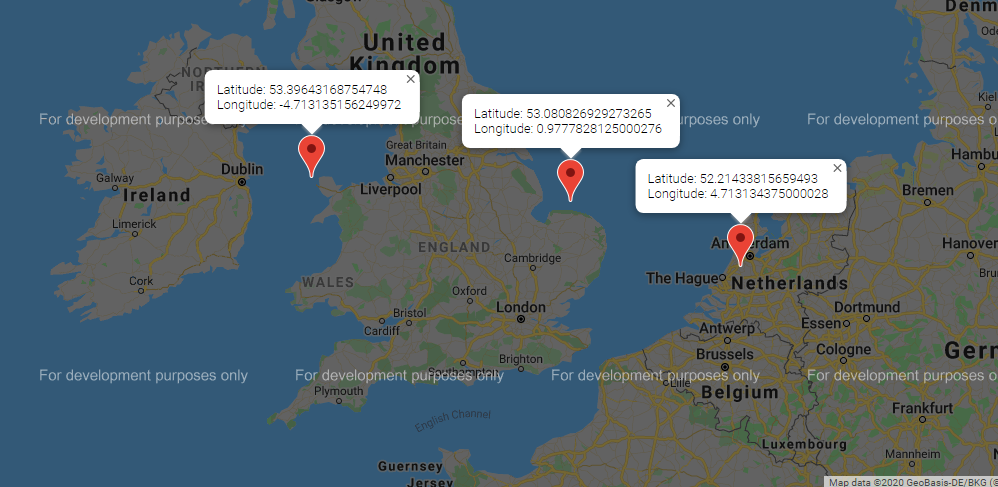
Click on map and get Longitude -Latitude. How To Get Longitude – Latitude When Clicked On Map? <div id=”MyMap” style=”width:100%;height:500px;”></div> <script> function myMap() { var mapCanvas = document.getElementById(“MyMap”); var myCenter=new google.maps.LatLng(51.508742,-0.120850); var mapOptions = {center: myCenter, zoom: 5}; var map = new google.maps.Map(mapCanvas, mapOptions); google.maps.event.addListener(map,’click’, function(event) { LocationMarker(map, event.latLng); }); } function LocationMarker(map, location) {…
Read more: Click on map and get Longitude -Latitude. -
WooCommerce: Show Required Field Errors Inline on Checkout Page.
WooCommerce: Show Required Field Errors Inline on Checkout Page. How To Show Required Field Errors Inline on Checkout Required Fields. On WooCommerce checkout page all error are shown on top of form as we can see this in image. Before: Before Adding inline error to required field first we need to get all the fields…
Read more: WooCommerce: Show Required Field Errors Inline on Checkout Page. -
WooCommerce: Add A New Checkout Field.
WooCommerce: Add A New Checkout Field. We know that checkout page is one of the most important parts of every WooCommerce store.Let’s found out how to add custom fields in WooCommerce checkout. WooCommerce checkout page is the most important page for both seller and customer. Customers have to provide important information like addresses, billing details,…
Read more: WooCommerce: Add A New Checkout Field. -
WooCommerce : Add Custom Taxonomy Filter on Products Dashboard.
WooCommerce : Add Custom Taxonomy Filter on Products Dashboard. How To Filter Products by Taxonomies in the Dashboard? WooCommerce provide Many Product filters on admin screen , such as “Select a category”, “Filter by product type”, “Filter by stock status”. For example ,if you want to add Custom filters like “Filter by tags” etc on…
Read more: WooCommerce : Add Custom Taxonomy Filter on Products Dashboard. -
WooCommerce : Remove Meta boxes On Product Edit Admin Page.
WooCommerce : Remove Meta boxes On Product Edit Admin Page. How to Remove Short Description Metabox,Product Tags Metabox,Product Excerpt Metabox,Product Categories Metabox etc. There are many meta boxes on product page. some are added by default by WordPress and some are added by WooCommerce plugin. Like product tag, product categories, product gallery etc are added…
Read more: WooCommerce : Remove Meta boxes On Product Edit Admin Page. -
WooCommerce : Add New Page and Link it to WordPress > Products.
WooCommerce : Add New Page and Link it to WordPress > Products. How to add a submenu item to the WooCommerce “Products” admin menu? For Adding a submenu to any admin menu we will use “add_submenu_page” function. add_submenu_page( string $parent_slug, string $page_title, string $menu_title, string $capability, string $menu_slug, callable $function = ”, int $position =…
Read more: WooCommerce : Add New Page and Link it to WordPress > Products. -
WooCommerce : Add text to the WooCommerce thank you page.
WooCommerce : Add text to the WooCommerce thank you page. How To show Thank you massage or offers or related product or any other information on Woocomerce Thank you page?, Woocomerce thank you page is the last impression of our site to buyer. Your site can have a great sell, but if you please them…
Read more: WooCommerce : Add text to the WooCommerce thank you page.

- Company
- Portfolio
-
- Hire Dedicated Developers
- Hire Chatbot Developers
- Hire Flutter Developer
- Hire iOS Developer
- Hire Smart Contract Developer
- Hire Solidity Developer
- Hire Ethereum Developer
- Hire Laravel Developer
- Hire MERN Stack Developer
- Hire Web Design Developer
- Hire AI Development Services
- Hire React Developer
- Hire Node.js Developer
- Hire Python Developer
- Hire Full Stack Developer
- Blog

 HR +91-7321873685