Most teams that ask us for “an AI agent” do not need one. They need a well-built prompt with the right data behind it. Others really do need an agent, and a few need something stricter: a graph of steps with checkpoints and human sign-off. Choosing the wrong AI agent approach is the most common reason AI projects run over budget or never reach production.
This guide explains the three approaches in plain terms, what changed in the tooling this month, and how to pick one for your product. It is written for founders, product owners and CTOs planning an AI feature in 2026.
Key takeaways
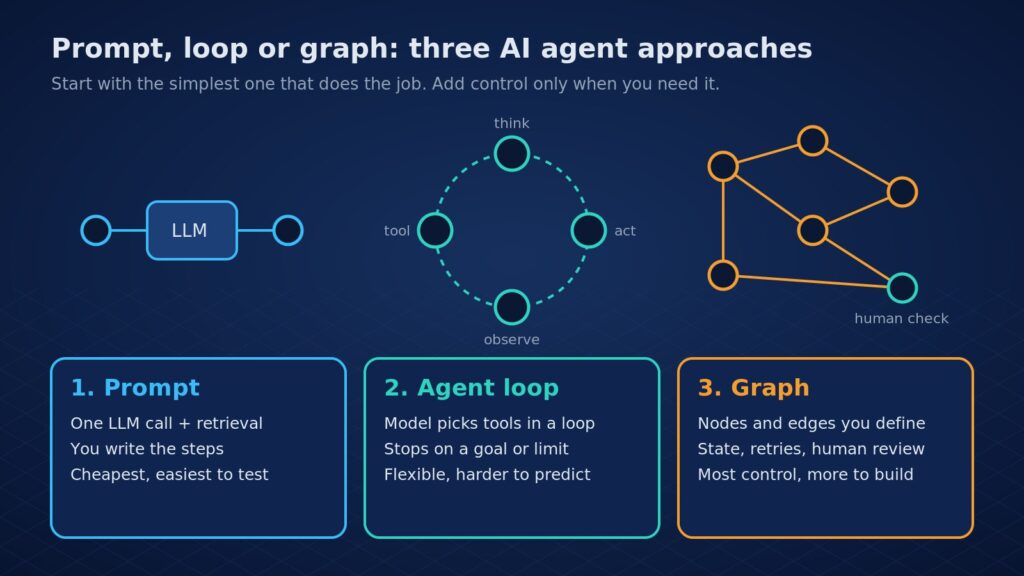
- Prompt: one model call, often with retrieval. You control the steps. Start here for FAQ bots, summaries, drafting and data extraction.
- Agent loop: the model decides which tools to call, in a loop, until it reaches a goal or a limit. Use it when the steps cannot be known in advance.
- Graph: you define the steps as nodes and edges, with saved state, retries and human approval points. Use it for long, high-stakes or regulated workflows.
- Anthropic’s engineering team advises finding the simplest solution and adding complexity only when needed (Building effective agents).
- New in October 2026: OpenAI Agents SDK v0.24.0, LangGraph 1.2.x updates and Agent Skills joining the Agentic AI Foundation. The approaches stay the same; the building blocks keep getting better.
In this guide
- The three AI agent approaches in plain terms
- Prompt vs agent loop vs graph: side by side
- How to choose: four questions
- What changed in agent tooling in October 2026
- Cost, risk and compliance
- FAQ
The three AI agent approaches in plain terms
1. Prompt (a single, well-built LLM call)
You send the model one request with clear instructions, examples and the right data, usually pulled from your documents by retrieval (RAG). Your code decides what happens before and after. In Building effective agents, Anthropic writes that for many applications, “optimizing single LLM calls with retrieval and in-context examples is usually enough.” A chain of two or three fixed prompts still counts here: the steps are yours, not the model’s.
2. Agent loop (the model drives)
Anthropic describes agents as LLMs using tools based on environmental feedback in a loop. The model reads the task, picks a tool (search, database query, API call), looks at the result and decides what to do next, until it finishes or hits a stopping condition such as a step limit. Frameworks like the OpenAI Agents SDK give you this loop built in, plus handoffs between agents, guardrails, sessions and tracing.
3. Graph (you design the flow, the model fills in steps)
In a graph, each step is a node and you decide which node runs next, sometimes based on the model’s output. LangGraph is the best-known example: its docs describe a low-level runtime for long-running, stateful agents, with durable execution, persistence, memory and human-in-the-loop. If a run fails at step 7, it can resume from step 7. Its interrupts feature lets a workflow pause for a person to approve, edit or reject an action.
Prompt vs agent loop vs graph: side by side
| Prompt | Agent loop | Graph | |
|---|---|---|---|
| Who decides the steps | Your code | The model | Your code, with model choices at set points |
| Best for | FAQ and support bots, summaries, extraction, drafting | Research, coding and ops tasks with unknown steps | Long workflows, approvals, regulated or multi-team processes |
| Predictability | High | Lower; paths change run to run | High, by design |
| Cost per task | Lowest | Varies; more calls per task | Medium; extra calls only where you allow them |
| Testing | Simple: input in, output checked | Harder: needs traces and evals | Test each node, then the whole flow |
| Example tools | Any model API plus RAG | OpenAI Agents SDK, Claude Managed Agents | LangGraph |
A related choice is how the model finds facts. Standard RAG searches text chunks by similarity. Microsoft’s GraphRAG first builds a knowledge graph from your documents, which helps with questions about themes and connections across a whole collection. It costs more to index, so use it when plain retrieval keeps missing the big picture, not by default.
How to choose: four questions
We ask clients these four questions in the first scoping call.
- Can you write the steps down? If yes, use a prompt or a fixed chain. If the steps depend on what the AI finds along the way, you need a loop or a graph.
- What does a wrong action cost? If the AI only drafts text a person reviews, a loop is fine. If it can refund money, change records or email customers, put those actions behind graph nodes with human approval.
- How long does a task run? Seconds: a prompt or simple loop. Minutes to days, or across shifts: a graph with saved state, so work survives restarts.
- Who has to audit it? If compliance, finance or a client needs to see why a decision was made, a graph with traces is far easier to explain.
Three real-world patterns we see:
| Use case | Approach we would start with | Why |
|---|---|---|
| Website or WhatsApp FAQ bot | Prompt + RAG | Known question types; speed and low cost matter most |
| Invoice or contract processing | Graph | Fixed stages, validation rules and a human check on exceptions |
| Internal research or ops assistant | Agent loop with limits | Steps vary by request; a person reviews the output |
Not sure which approach fits your product? Share your use case and Eoxys will map it to prompt, loop or graph, with a stack and budget range. Get a real project estimate within 24 hours. NDA on request.
What changed in agent tooling in October 2026
The approaches above have been stable for a while. What keeps moving is the tooling that makes them cheaper to build and safer to run:
- OpenAI Agents SDK v0.24.0 shipped on 15 October 2026 (release notes). The SDK covers the agent loop, handoffs, guardrails, human-in-the-loop, tracing, MCP tools and sandboxed agents. OpenAI’s docs note you can use the Responses API directly if you want to own the loop yourself.
- LangGraph 1.2.x keeps adding production fixes; 1.2.16 (16 October) focused on resume behaviour, and another release followed this week (LangGraph releases).
- Agent Skills joined the Agentic AI Foundation on 22 October 2026. Anthropic donated the format, which packages instructions and scripts an agent can load on demand, and says more than 70 agent platforms have integrated it (Anthropic announcement). The foundation also hosts MCP, A2A and AGENTS.md, so the plumbing between agents and tools is becoming shared and vendor-neutral.
- Managed agent runtimes are now an option. Claude Managed Agents, in public beta since 8 April 2026, runs the agent loop, sandbox and checkpoints for you, priced at normal token rates plus $0.08 per session-hour of active runtime.
For buyers, the practical point is lock-in. Building on open standards such as MCP and Agent Skills makes it easier to switch models or frameworks later. We design agents so the business logic does not depend on one vendor’s SDK.
Cost, risk and compliance
Agent loops make more model calls per task, so cost and latency are less predictable. Errors can also compound: a wrong early step leads the agent down a wrong path. Anthropic’s guide recommends sandboxed testing and guardrails for this reason. In practice we set step and spend limits, log every tool call, and review traces before launch; our guide to AI agent observability covers how.
If your agent handles personal data of users in India, the DPDP rules apply to what it stores and logs. If you serve EU users, check where the EU AI Act places your use case. Graphs make both easier, because you can see and control exactly where data flows. For budgets, our AI agent cost guide breaks down build and running costs.
FAQ
What is the difference between an AI agent and a prompt?
A prompt is one model call where your code controls every step. An AI agent runs in a loop: the model decides which tool to use next, checks the result and continues until it reaches a goal or a limit. Agents handle open-ended tasks better, but they cost more per task and are harder to test.
Is LangGraph better than an agent loop?
Neither is better in general. LangGraph suits long, stateful workflows that need checkpoints, retries and human approval. A plain agent loop, for example with the OpenAI Agents SDK, is faster to build for short tasks where the steps vary. Many production systems use a graph with a small agent loop inside one node.
When should I use GraphRAG instead of normal RAG?
Use GraphRAG when users ask broad questions across many documents, such as recurring themes in thousands of support tickets, and normal retrieval keeps missing the bigger picture. For direct look-ups like policy or product questions, standard RAG is cheaper and usually enough. Test both on your own data before deciding.
How long does it take to build an AI agent?
It depends on the approach and integrations. A prompt-based bot on your documents can be a short project, while a graph workflow with approvals and several system integrations takes longer. We give a scoped timeline after a short call about your data, tools and risk level, not a one-size estimate.
Build the right AI agent with Eoxys
Eoxys IT Solution has built software, apps and AI products since 2009, with 700+ projects delivered by a 55+ person team and real client reviews. See our portfolio, our AI and machine learning solutions, or hire dedicated AI developers and chatbot developers for your team.
We will tell you honestly if a prompt is enough, and build a loop or graph only where it pays off. Get a real project estimate within 24 hours. NDA on request. Prefer to talk? Call +91 96678 22661.
Related reading:
- AI Agents in 2026: From Helpful Assistants to Autonomous Digital Co-Workers
- Custom AI Agent vs Off-the-Shelf Tools: How to Decide
- How Much Does It Cost to Build an AI Agent in 2026?
Sources
Checked on 24 Oct 2026 against Anthropic’s engineering guide and announcements, LangChain’s LangGraph docs and GitHub releases, OpenAI’s Agents SDK docs and GitHub releases, Claude’s Managed Agents announcement, Microsoft GraphRAG docs and the Agentic AI Foundation. Versions and prices change often; check the vendor page before you build.
- Anthropic: Building effective agents
- LangChain: LangGraph overview
- LangChain: LangGraph interrupts (human-in-the-loop)
- GitHub: LangGraph releases
- OpenAI Agents SDK documentation
- GitHub: OpenAI Agents SDK releases
- Claude: Claude Managed Agents
- Microsoft: GraphRAG
- Anthropic: Donating Agent Skills to the Agentic AI Foundation
- Agentic AI Foundation: four new projects

Shafeeq Khan is a web developer who creates modern, responsive, and user-friendly websites with clean code and creative design