Most product owners do not need a new app to get AI features. They need a safe way to add search, chat, summaries or smart forms to the app they already have. This guide explains how to integrate AI into an app that is live today, without a rewrite and without locking yourself into one model.
It covers choosing features, the architecture we recommend, options for Flutter, React Native, iOS, Android and web, and how to estimate running costs from official price lists. Prices and dates were checked on 29 October 2026.
Key takeaways
- Start with two or three features tied to a clear user problem, not a general chatbot.
- Put an AI gateway (a small backend service) between the app and the model provider, and switch features on with flags.
- Plan for model retirement: OpenAI will shut down GPT-4o and GPT-4.1 in its API on 14 January 2027 (OpenAI deprecations).
- Running costs are often small per request, but test with real traffic before you commit to a budget.
In this guide
- Pick the right first features
- The architecture: an AI gateway plus flags
- Flutter, React Native, native and web options
- Step-by-step rollout
- What it costs to run
- Risks to plan for
- FAQ
Pick the right first features
Good first AI features share three traits: they save users time on a task they already do, the input data already exists in your app, and a wrong answer is easy to spot and fix. Common examples:
| Feature | Good fit when | Typical data needed |
|---|---|---|
| Smart search | Users struggle to find items, articles or records | Your catalogue, help articles or records |
| Summaries | Users read long threads, reports or reviews | Text already stored in the app |
| Chat assistant | Support questions repeat and answers are documented | Help centre, policies, order data |
| Form autofill / extraction | Users type data from documents or photos | Uploaded images, PDFs or emails |
| Drafting help | Users write messages, listings or replies | Templates and past examples |
For a wider list of mobile AI use cases, see our guide to AI in mobile app development.
The architecture: an AI gateway plus flags
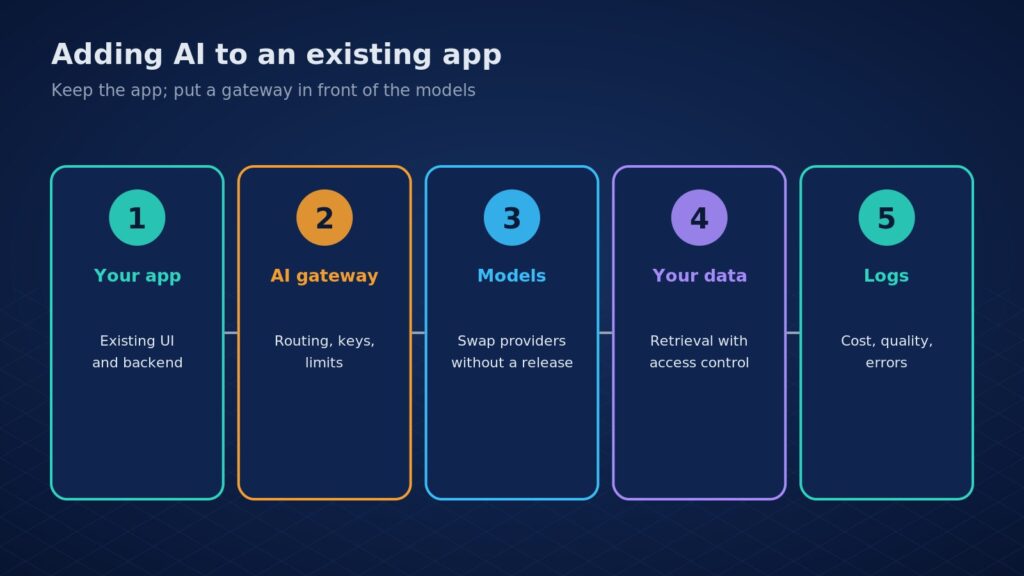
Our recommended pattern keeps your existing app and backend almost untouched:
- AI gateway: a small service with your own API (for example
/ai/summarise). The app calls it; it calls the model provider. Keys never ship in the app. - Model abstraction: the gateway maps each feature to a model in configuration, so you can change provider or version without an app store release.
- Feature flags: roll out to a small share of users first using a tool such as Firebase Remote Config or your own flags.
- Your data layer: the gateway fetches only the records a user is allowed to see, then adds them to the prompt.
- Logs and evaluation: record inputs, outputs, latency and cost so you can measure quality, as covered in our observability guide.
The model abstraction matters more than it looks. On 14 October 2026 OpenAI notified developers that GPT-4o, GPT-4o mini, GPT-4.1 and GPT-4.1 mini leave its API on 14 January 2027, with gpt-6-luna as the recommended replacement. Apps that hard-coded a model name now need code changes; apps behind a gateway change one setting and re-test. Our GPT-4o migration guide covers the details.
Have a live app and a shortlist of AI ideas? Eoxys can review your stack, pick the first features and build the gateway alongside your current code. Get a real project estimate within 24 hours. NDA on request.
Flutter, React Native, native and web options
| Platform | Cloud model option | On-device option | Notes |
|---|---|---|---|
| Flutter | Your gateway, or Firebase AI Logic (Dart SDK) | Platform channels to native APIs | Firebase AI Logic offers client SDKs for Swift, Kotlin/Java, JavaScript, Dart and Unity |
| React Native | Your gateway over HTTPS | Native modules | Keep keys server-side |
| iOS (Swift) | Your gateway or Firebase AI Logic | Apple Foundation Models framework | See our Siri AI integration guide |
| Android (Kotlin) | Your gateway or Firebase AI Logic | ML Kit GenAI APIs (Gemini Nano) | On-device support depends on the device |
| Web | Your gateway | Limited; usually cloud | Stream responses for a fast feel |
Google’s ML Kit documentation says its GenAI APIs use Gemini Nano to run generative tasks on the device, built on Android’s AICore service. On-device models suit short, private tasks; cloud models suit longer reasoning and up-to-date knowledge. Many apps use both. Eoxys builds with Flutter, React Native and native code through our mobile and web app development team.
Step-by-step rollout
1. Define success
Write down the task, the user, and how you will measure the result: time saved, support tickets avoided, or search success rate.
2. Build the gateway and one feature
Ship the gateway with one feature behind a flag. Add rate limits, timeouts and a fallback message if the model is slow or down.
3. Test with real examples
Collect 50 to 100 real inputs and check the outputs by hand. Fix prompts and data access before widening the rollout.
4. Roll out gradually
Go from internal users to a small share of customers, then everyone, watching cost, latency and complaints at each stage.
5. Review every quarter
Check the provider’s deprecations page, compare newer models on your test set, and review privacy obligations. For Indian users, see our DPDP compliance guide for AI apps.
What it costs to run
Build cost depends on your codebase and the number of features, so we quote after a short review. Running cost is easier to estimate from list prices. OpenAI’s pricing page lists gpt-6-luna at $0.10 per million input tokens and $0.50 per million output tokens on the Standard tier, and gpt-6.1-terra at $1.00 and $5.00.
| Example (our arithmetic) | Tokens per request | Cost per request | 100,000 requests a month |
|---|---|---|---|
| Summary on gpt-6-luna | 1,000 in, 300 out | $0.00025 | About $25 |
| Same summary on gpt-6.1-terra | 1,000 in, 300 out | $0.0025 | About $250 |
Real costs move with prompt length, how much of your data you add, reasoning settings and retries, so measure in the pilot. Hosting the gateway is usually a small cloud cost; our cloud team can set it up on AWS or Google Cloud.
Risks to plan for
- Prompt injection: user content can try to override instructions. The OWASP Top 10 for LLM applications lists it first.
- Data leakage: only send the data a feature needs, and check your provider’s data-use terms.
- Wrong answers: show sources, let users edit outputs, and keep a human path for anything important.
- Model changes: pin model versions in the gateway and re-run your test set before switching.
FAQ
How do I integrate AI into an existing app?
Add a small AI gateway service between your app and the model provider, start with one or two features behind feature flags, test on real examples and roll out gradually. Your existing app and database stay in place, and you can switch model providers later without shipping a new app release.
How much does it cost to integrate AI into an app?
Build cost depends on your codebase and the features you choose, so it needs a short review. Running cost can be small: at OpenAI’s list prices, a short summary on gpt-6-luna costs a fraction of a cent per request. Add hosting for the gateway, logging and the time to review outputs.
Can I add AI to a Flutter or React Native app?
Yes. Both can call your own AI gateway over HTTPS. Flutter can also use the Firebase AI Logic Dart SDK, and both can reach on-device models on iOS and Android through native code. Keep API keys on your server, never inside the app bundle, whichever framework you use.
Can Eoxys add AI features to my app?
Yes. We review your app, recommend the first features, build the gateway and ship them behind flags, then monitor cost and quality after launch. We work on fixed-cost, dedicated-team or hourly terms. Get a real project estimate within 24 hours, with an NDA on request.
Work with Eoxys
Eoxys IT Solution LLP has built websites, apps and AI products since 2009, with 700+ projects delivered. See the work on our portfolio, or explore our AI and machine learning solutions.
We add AI features to live Flutter, React Native, native and web apps without a rewrite. Get a real project estimate within 24 hours. NDA on request. Prefer to talk? Call +91 96678 22661.
Related reading:
- GPT-4o API Shutdown: Migrate Your App Before 14 January 2027
- Siri AI Integration for iOS Apps: How to Get Your App Ready
- Artificial Intelligence in Mobile App Development: The Complete 2025 Guide
Sources
Checked on 29 Oct 2026 against OpenAI’s deprecations and pricing pages and Firebase, Apple and Google developer documentation. Cost examples are our own arithmetic from list prices.
- OpenAI: Deprecations
- OpenAI: API pricing
- Firebase AI Logic documentation
- Firebase Remote Config
- Apple: Foundation Models framework
- Google: ML Kit GenAI APIs
- OWASP: Top 10 for LLM Applications

Shafeeq Khan is a web developer who creates modern, responsive, and user-friendly websites with clean code and creative design