Many WordPress owners have heard they need an llms.txt file to show up in ChatGPT or Google’s AI answers. Others worry that AI bots are scraping their content and want to block them all. Both reactions can cost you: one wastes effort, the other can quietly remove you from AI search answers.
This guide explains what llms.txt on WordPress can and cannot do, what Google has said about it, which AI crawlers do what, and how to set up robots.txt and llms.txt on WordPress without breaking anything. Everything here was checked against official documentation on 29 October 2026.
Key takeaways
- Google says llms.txt files aren’t needed for Google Search and “won’t negatively or positively impact your visibility or rankings” (Google Search Central, 15 June 2026).
- llms.txt is a proposed standard that may help other AI tools and agents find your key pages. It is cheap to add but not a ranking lever.
- robots.txt matters more: most AI companies separate search crawlers from training crawlers, so you can block training and still be cited.
- On WordPress, generate llms.txt with your SEO plugin, edit robots.txt carefully, and check your CDN or firewall is not blocking the bots you allowed.
In this guide
- What llms.txt is
- What Google says
- AI crawlers: search vs training
- Setting it up on WordPress
- A sample robots.txt
- Common mistakes
- FAQ
What llms.txt is
llms.txt is a plain Markdown file at the root of a site (yoursite.com/llms.txt). The llmstxt.org proposal, first published by Jeremy Howard in September 2024 and updated in August 2026, describes it as a way “to provide information to help agents use a website”: a short summary plus links to your most useful pages, in a format that is easy for language models to read.
It does not control access. robots.txt says which bots may crawl. llms.txt only suggests what to read. A bot that ignores robots.txt will ignore llms.txt too.
What Google says
On 15 June 2026 Google added a note to its AI optimization guide. The Search Central changelog sums it up: these files “aren’t needed for Google Search (and won’t negatively or positively impact your visibility or rankings)”, but “it’s fine if you want to maintain these files for other services or systems that use them.”
So for Google AI Overviews and AI Mode, the usual basics still apply: crawlable pages, clear answers and content people trust. Our guide to AI Overviews and Google Search covers those.
AI crawlers: search vs training
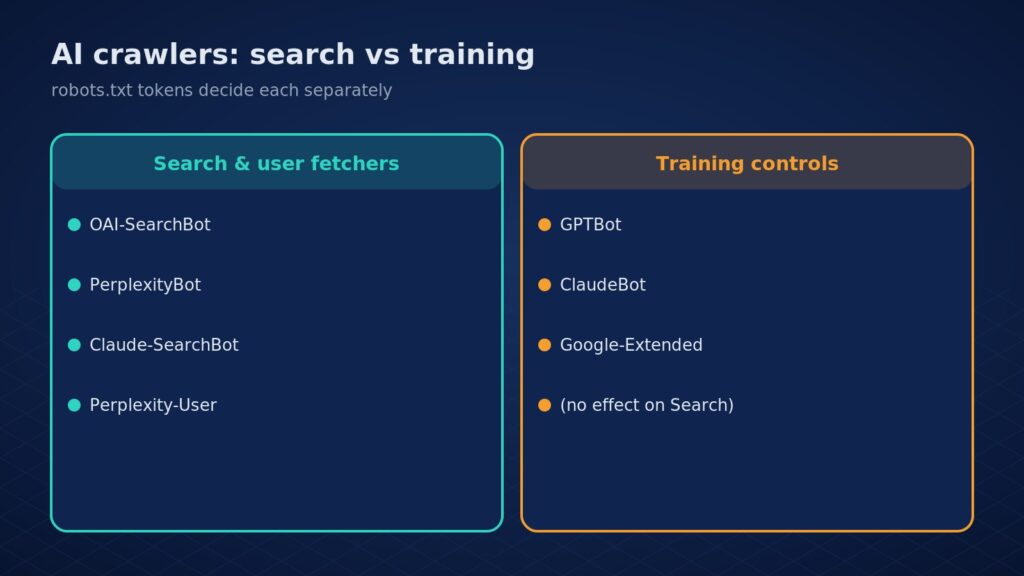
The key point is that most AI companies run separate bots for search, for user-requested fetches, and for training. Each can be allowed or blocked on its own.
| Company | Token | What it is for | Source |
|---|---|---|---|
| OpenAI | OAI-SearchBot | Search results in ChatGPT | OpenAI crawlers |
| OpenAI | GPTBot | Content that may be used for training foundation models | OpenAI crawlers |
| Perplexity | PerplexityBot | Surfacing and linking sites in Perplexity search; not for training | Perplexity crawlers |
| Perplexity | Perplexity-User | Fetches a page when a user asks; generally ignores robots.txt | Perplexity crawlers |
| Anthropic | Claude-SearchBot | Indexing to improve Claude search results | Anthropic help centre |
| Anthropic | ClaudeBot | Collecting content that could contribute to model training | Anthropic help centre |
| Google-Extended | Gemini training and grounding; does not affect Google Search | Google crawler docs |
OpenAI’s docs give the exact example: a webmaster “can allow OAI-SearchBot in order to appear in search results while disallowing GPTBot” to opt out of training. Google states that Google-Extended “does not impact a site’s inclusion in Google Search nor is it used as a ranking signal”.
Not sure which bots reach your site today? Eoxys checks robots.txt, CDN rules and server logs as part of an AI visibility audit. Get a real project estimate within 24 hours. NDA on request.
Setting it up on WordPress
1. Generate llms.txt with your SEO plugin
Yoast SEO can generate an llms.txt file “automatically with a click” in Yoast SEO and its premium editions. Other SEO plugins offer similar options. Check the output: it should list your service pages, key guides and contact page, not every tag archive.
2. Review robots.txt
WordPress serves a virtual robots.txt unless a physical file exists. Edit it through your SEO plugin’s file editor or your host’s file manager, and keep a copy of the old version first.
3. Check your CDN and firewall
Many CDNs and security plugins can block AI bots regardless of robots.txt. Cloudflare, for example, offers AI Crawl Control to analyse and manage AI crawler traffic. Make sure these rules match what you set in robots.txt.
4. Verify
Open yoursite.com/robots.txt and yoursite.com/llms.txt in a private window, then check server or CDN logs over the following days for the user agents you allowed.
Need help on a WordPress site? Our WordPress development team handles this kind of technical setup.
A sample robots.txt
A common starting point for a business that wants AI search citations but not training use. Adjust it to your own policy:
User-agent: OAI-SearchBot
Allow: /

User-agent: PerplexityBot
Allow: /

User-agent: Claude-SearchBot
Allow: /

User-agent: GPTBot
Disallow: /

User-agent: ClaudeBot
Disallow: /

User-agent: Google-Extended
Disallow: /

User-agent: *
Disallow: /wp-admin/
Allow: /wp-admin/admin-ajax.php

Sitemap: https://example.com/sitemap_index.xml
Blocking Google-Extended is a business decision. It does not affect Google Search, but it does stop your content being used to ground answers in Gemini Apps. If being cited in Gemini matters to you, leave it allowed.
Common mistakes
- Blocking every AI bot with one rule, which also removes you from AI search answers.
- Expecting llms.txt to raise Google rankings.
- Allowing bots in robots.txt while a firewall blocks them.
- Listing thin or outdated pages in llms.txt.
- Editing robots.txt with no backup and accidentally blocking the whole site.
Crawler access is one part of AEO. For the rest, see our AEO services guide and how to get your business recommended by ChatGPT.
FAQ
Does llms.txt help SEO?
Not for Google. Google says llms.txt won’t positively or negatively affect visibility or rankings in Google Search. It may help other AI tools and agents that choose to read it, but no major search engine has said it uses the file for ranking. Treat it as an optional extra, after robots.txt, crawlable HTML and clear content.
Should I block GPTBot?
Blocking GPTBot asks OpenAI not to use your content for training. It does not remove you from ChatGPT search, which uses OAI-SearchBot, according to OpenAI’s crawler documentation. Each token is handled separately, so you can allow search while opting out of training. OpenAI says robots.txt changes can take about 24 hours to apply.
How do I add llms.txt to WordPress?
Use your SEO plugin’s llms.txt option (Yoast offers one) or upload a Markdown file to the site root. Then open yoursite.com/llms.txt to confirm it loads. Check that a caching or security plugin, or your CDN, is not blocking the file or rewriting it.
Can Eoxys set this up for my site?
Yes. We review robots.txt, llms.txt, CDN rules and logs, then make the changes with a backup and confirm each AI crawler can reach the pages you want cited. Get a real project estimate within 24 hours, with an NDA on request.
Work with Eoxys
Eoxys IT Solution LLP has built websites, apps and AI products since 2009, with 700+ projects delivered. See the work on our portfolio, or explore our AI and machine learning solutions.
We set up AI crawler access, llms.txt and AEO basics on WordPress sites, with a backup of every change. Get a real project estimate within 24 hours. NDA on request. Prefer to talk? Call +91 96678 22661.
Related reading:
- AEO Services: Get Cited in ChatGPT and Google AI Overviews
- Google AI Overviews: What Businesses Need to Know in 2026
- AI Visibility Audit: Check If ChatGPT and AI Overviews Cite You
Sources
Checked on 29 Oct 2026 against Google Search Central, the llmstxt.org proposal, OpenAI, Perplexity, Anthropic, Yoast and Cloudflare documentation.
- Google Search Central: Latest updates (15 June 2026 llms.txt note)
- Google: AI optimization guide
- llmstxt.org: The /llms.txt file
- OpenAI: Overview of OpenAI crawlers
- Perplexity: Crawlers
- Anthropic: Does Anthropic crawl data from the web?
- Google: Common crawlers (Google-Extended)
- Yoast: llms.txt feature
- Cloudflare: AI Crawl Control

Shafeeq Khan is a web developer who creates modern, responsive, and user-friendly websites with clean code and creative design