Ask ChatGPT, Gemini or Google’s AI Mode to recommend a company like yours. Did it name you? Did it link to your site, or to a competitor’s? Did it get your services and location right? Most businesses have never checked.
An AI visibility audit is a repeatable way to find out. You run fixed buyer questions through the main AI engines, log who gets mentioned and cited, check crawler access, and compare results with Google and Bing reports. Here is how to run one by hand, plus what changed this month: Google’s 15 October update to AI Mode and AI Overviews, Bing’s new Topics Portfolio and a ChatGPT tracking bug that may have skewed your October analytics.
Key takeaways
- An AI visibility score is only useful if it has a fixed prompt set, a stated denominator and the same test conditions every month.
- Track four things separately: mentioned, cited (linked), recommended, and accurate. A mention with wrong facts is a problem, not a win.
- Search Console’s Generative AI performance report and Bing’s AI Performance report give first-party data. Neither shows everything, so pair them with your manual log.
- If you saw a drop in ChatGPT referrals around 8 to 15 October 2026, check it against the UTM bug before you change anything.
In this guide
- What an AI visibility audit measures
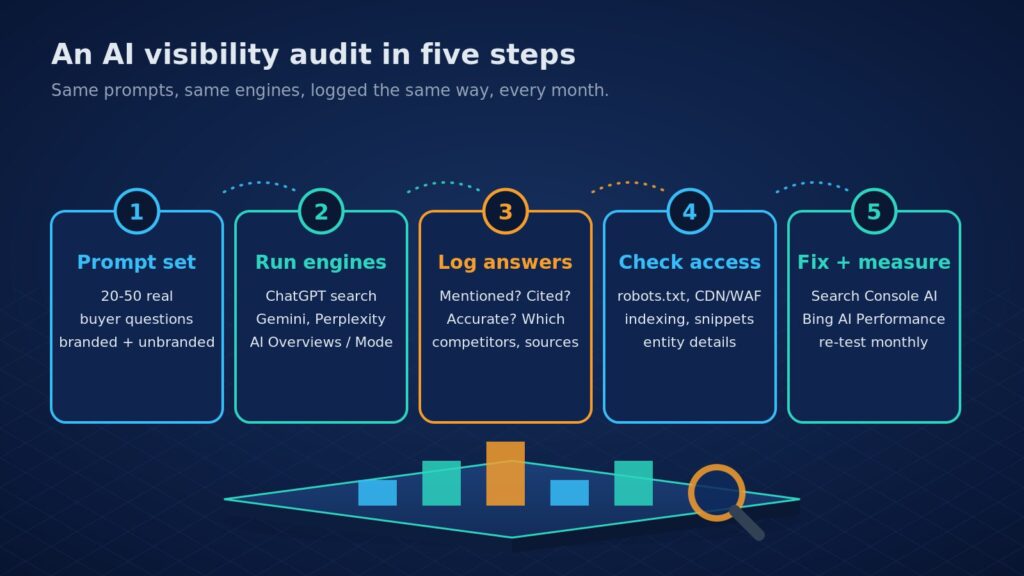
- Step 1: Build your prompt set
- Step 2: Run the engines and log every answer
- Step 3: Score it honestly
- Step 4: Check access and eligibility
- Step 5: Compare with first-party reports
- What changed in October 2026
- FAQ
What an AI visibility audit measures
An AI answer names only a handful of sources, so an audit asks four separate questions for each prompt:
- Mention: is your brand named in the answer?
- Citation: is one of your URLs linked as a source?
- Recommendation: are you suggested as an option to choose, not just referenced?
- Accuracy: are your services, prices, locations and contact details correct?
Keep them apart. You can be cited for a how-to article but never recommended as a vendor. Our AEO services guide explains how each engine finds sources; this post is the hands-on measurement part.
Step 1: Build your prompt set
Write 20 to 50 questions your buyers actually ask before they contact you. That range is our working rule of thumb, not a published standard. Pull them from sales calls, enquiries and Search Console queries. Mix three types:
- Unbranded discovery: “best mobile app development company in Jaipur”, “who can build a WooCommerce B2B portal”.
- Problem questions: “how much does an AI chatbot for a clinic cost”, “React Native or Flutter for a delivery app”.
- Branded checks: “what does [your brand] do”, “is [your brand] reliable”, “[your brand] vs [competitor]”.
Freeze the list in a spreadsheet. If you change the prompts every month, your trend line means nothing.
Step 2: Run the engines and log every answer
Run each prompt in ChatGPT with search on, Gemini, Perplexity, Microsoft Copilot, and Google Search (note whether an AI Overview appeared, and try AI Mode). Google’s AI features documentation says AI Overviews and AI Mode can use different models and run several related searches (query fan-out), so treat them as two surfaces, and expect that many queries show no AI Overview at all.
Answers vary by account, location, chat history and wording. Use a logged-out or clean session where you can, write down the country and device, and run each prompt the same way every time. Log one row per prompt per engine:
| Column | What to record |
|---|---|
| Prompt and engine | Exact wording, engine, mode (search on/off), date |
| Conditions | Signed in or not, country, device, memory or history state |
| Mentioned / recommended | Yes or no for each, plus position in the answer |
| Cited URLs | Which of your URLs were linked, if any |
| Competitors | Every other brand named, and every domain cited |
| Accuracy notes | Wrong or outdated facts about you, word for word |
Step 3: Score it honestly
An “AI visibility score” from a tool is only as good as its method. If you calculate your own, state the denominator every time:
- Mention rate = answers that name you ÷ answers checked.
- Citation rate = answers that link your site ÷ answers checked.
- Accuracy rate = mentions with correct facts ÷ total mentions.
- Share of voice = your mentions ÷ all brand mentions in the same answers.
Report each engine separately; a strong Perplexity result can hide a zero in ChatGPT. Then look at the cited domains in your log: if engines keep citing a directory, a review site or a competitor’s comparison page, that shows which sources shape your category.
Want an expert to run this audit for you? Eoxys can build your prompt set, run the engines, check crawler access on your stack and hand you a fix list. Get a real project estimate within 24 hours. NDA on request.
Step 4: Check access and eligibility
Low citation rates are often a technical problem, not a content one. OpenAI’s crawler documentation says sites that opt out of OAI-SearchBot will not be shown in ChatGPT search answers, and that blocking GPTBot (training) is a separate setting. Perplexity recommends allowing PerplexityBot and its published IP ranges, and gives firewall examples. So check three layers: robots.txt, your CDN or firewall bot settings, and server logs for real crawler visits.
For Google, the AI features page says there are no extra requirements: a page must be indexed and eligible to show a snippet, and you do not need special AI text files or schema. Controls such as nosnippet, data-nosnippet, max-snippet and noindex limit what AI features can show. Also confirm your site is included in Search generative AI features in Search Console, as Google’s optimization guide notes. Fixes often mean server, CDN or theme changes, which our web development and WordPress teams handle.
Step 5: Compare with first-party reports
Your log shows what answers say; first-party reports show what happened at scale. Use both:
| Source | What it shows | Limits |
|---|---|---|
| Search Console: Generative AI performance report | Impressions in AI Overviews and AI Mode by page, country, device and date | Impressions only; may not appear if your site has too few |
| Bing Webmaster Tools: AI Performance | Citations in Copilot, Bing AI summaries and some partners; cited pages; sample grounding queries | Grounding queries are a sample; public preview |
| Bing: Topics Portfolio (beta) | Grounding queries grouped into topics, sites cited per topic, opportunity queries | Bing calls the numbers directional; needs enough data |
| Your analytics | Referral visits from chatgpt.com, perplexity.ai, copilot and gemini | Only counts clicks; ChatGPT referral data is incomplete |
Google rolled the Generative AI report out to all sites worldwide on 31 August 2026 (announced in June). If yours is missing, the help page says that usually means too few AI impressions, or that the site is excluded from Search generative AI features.
What changed in October 2026
- Google AI Mode and AI Overviews (15 Oct). Google said it is showing inline links higher in responses more often, testing a section at the top that surfaces official websites “with context about why each link is useful”, expanding timely-article carousels and testing clickable publisher profiles (Google blog).
- Bing Topics Portfolio (13 Oct). A new beta tab in AI Performance groups grounding queries into topics and lists opportunity queries where you could be cited (Bing Webmaster blog). Use it to find prompts to add.
- ChatGPT UTM bug. Search Engine Land reported that ChatGPT stopped adding utm_source=chatgpt.com to some links, that OpenAI called it a bug, and that a fix began rolling out on 15 October (Search Engine Land). Annotate 8 to 15 October in your analytics before you compare months.
If AI answers keep naming competitors instead of you, our guide to getting recommended by ChatGPT covers the content and reputation side.
FAQ
What is an AI visibility audit?
An AI visibility audit checks how AI answer engines such as ChatGPT, Gemini, Perplexity, Copilot and Google AI Overviews talk about your business. You run a fixed set of buyer questions, record whether you are mentioned, cited, recommended and described accurately, check crawler access, and compare the results with Search Console and Bing reports.
Can I check AI visibility without a paid tool?
Yes. Google Search Console and Bing Webmaster Tools give first-party AI data: impressions in AI Overviews and AI Mode, and citations in Copilot and Bing. A manual prompt log in a spreadsheet adds what those miss. Paid trackers automate prompt runs, but check how they sample answers before trusting their score.
How do I track brand mentions in ChatGPT?
Run the same prompts in ChatGPT with search on each month, in a clean session, and log whether your brand is named and which URLs are cited. In analytics, filter referrals from chatgpt.com and keep UTM tags in mind, since a bug removed them from some links until a fix began on 15 October 2026.
How often should I run an AI visibility audit?
Monthly works for most businesses, with a full re-check after big site changes, migrations or CDN updates. AI answers vary from one run to the next, so judge the trend across several months rather than one screenshot. Keep the prompt set, engines and test conditions the same so each month is comparable.
Get your AI visibility audit with Eoxys
Eoxys IT Solution has built websites, apps and AI products since 2009, with 700+ projects delivered and real client reviews. See the work on our portfolio, or explore our AI and machine learning solutions.
We run the audit, fix the crawler, indexing and content gaps on your site, and set up monthly tracking you can read. Get a real project estimate within 24 hours. NDA on request. Prefer to talk? Call +91 96678 22661.
Related reading:
- AEO Services: Get Cited in ChatGPT and Google AI Overviews
- How to Get Your Business Recommended by ChatGPT in 2026
- Google AI Overviews: What Businesses Need to Know in 2026
Sources
Checked on 26 Oct 2026 against Google’s Search blog and Search Central documentation, Search Console Help, the Bing Webmaster blog, OpenAI’s and Perplexity’s crawler documentation and Search Engine Land. The 20 to 50 prompt range is our rule of thumb, not a published figure. Features in beta or preview may change.
- Google: Updates to AI Mode and AI Overviews (15 Oct 2026)
- Google Search Central: AI features and your website
- Google Search Central: Optimizing for generative AI features
- Search Console Help: Generative AI performance report
- Google Search Central blog: Generative AI performance reports
- Bing Webmaster blog: Introducing AI Performance
- Bing Webmaster blog: Topics Portfolio beta
- OpenAI: Overview of OpenAI crawlers
- Perplexity: Perplexity crawlers
- Search Engine Land: ChatGPT UTM tracking bug

Shafeeq Khan is a web developer who creates modern, responsive, and user-friendly websites with clean code and creative design