 16+ Years Building Digital Products That Ship

 16+ Years Building Digital Products That Ship
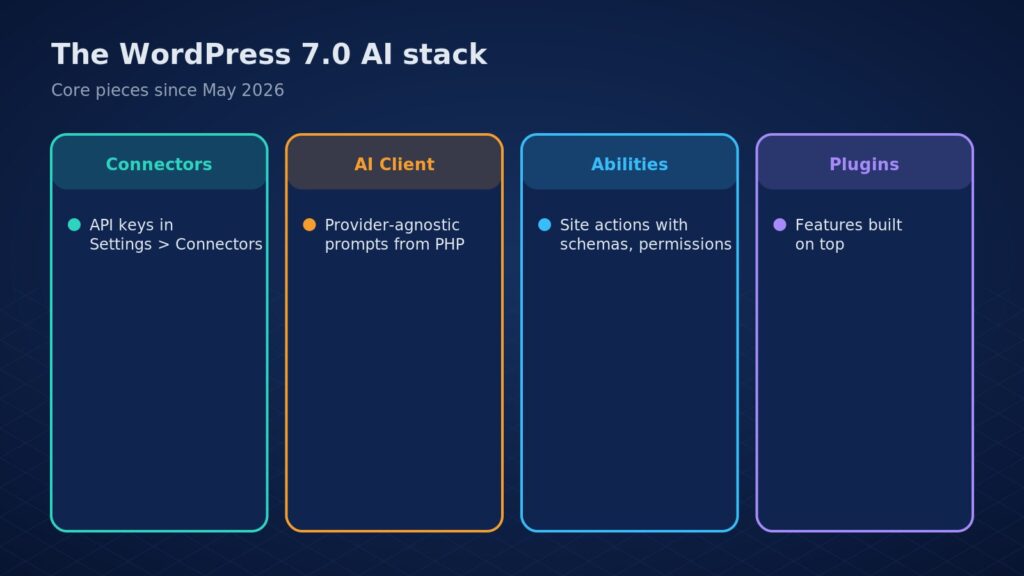
Until 2026, adding AI to WordPress meant picking a plugin and pasting an API key into its own settings page. WordPress 7.0 “Armstrong”, released on 20 May 2026, changed that by building AI plumbing into core. This guide explains what is now built in, the ways to add AI to a WordPress site, and the risks to plan for.
Checked against the WordPress.org release post, the 7.0 Field Guide and developer docs on 5 November 2026.
Key takeaways
- WordPress 7.0 includes a provider-agnostic AI Client that lets plugins send prompts to AI models.
- API keys are managed centrally in Settings > Connectors.
- The Abilities API (since 6.9) registers site actions with defined inputs, outputs and permissions, so AI agents can use them safely.
- Abilities are not exposed over REST unless a developer sets show_in_rest to true.
- Start with low-risk editorial tasks, then move to customer-facing features with testing and privacy checks.
In this guide
- What WordPress 7.0 added
- Three ways to add AI
- Use cases that work
- For developers
- Risks and costs
- Step-by-step plan
- FAQ
What WordPress 7.0 added
| Piece | What it does | Since |
|---|---|---|
| AI Client | Lets plugins call generative AI models through one interface; core routes requests | 7.0 |
| Connectors screen | Central place to manage external AI connections and keys | 7.0 |
| Abilities API | Registry of site actions with JSON Schema inputs/outputs and permission checks | 6.9 |
| Client-Side Abilities | JavaScript counterpart with UI and command palette | 7.0 |
| AI plugin | Optional plugin for images, titles, excerpts and alt text suggestions | Separate install |
Three ways to add AI
| Option | Best for | Trade-off |
|---|---|---|
| Official AI plugin + Connectors | Editorial help: titles, excerpts, alt text | Limited to what the plugin offers |
| Third-party AI plugins | Chatbots, search, translation | Check data handling and whether they use the core AI Client |
| Custom plugin on the AI Client and Abilities | Workflows unique to your business | Needs development and testing |
Need AI built into your WordPress or WooCommerce site? Eoxys has delivered 700+ projects since 2009 with a 55+ person team. Get a real project estimate within 24 hours.
Use cases that work
- Editorial support: draft titles, excerpts and alt text for a human to approve.
- On-site assistant: a chatbot that answers from your own pages and policies; see build an AI chatbot with your own data.
- Smarter search: natural-language search over products or articles.
- Admin workflows: summarise form entries, tag support requests, flag spam.
- Agent access: expose selected abilities so an external AI agent can act on the site, similar to the ideas in MCP server development.
For developers
The AI Client announcement shows the entry point: wp_ai_client_prompt() returns a prompt builder you configure, then call a method such as generate_text(). The Field Guide adds using_model_preference() to list preferred models with feature detection. For actions, register an ability with input and output schemas and a permission callback, as described in the Abilities API docs. By default abilities are hidden from REST; set show_in_rest to true only when you need external access, and the REST endpoints require an authenticated user.
Risks and costs
| Risk | Mitigation |
|---|---|
| Personal data sent to AI providers | Check provider terms, minimise data, update your privacy notice |
| Wrong or invented answers on the front end | Ground answers in your content; add human review for publishing |
| Over-broad agent permissions | Tight permission callbacks; read-only abilities first |
| Unexpected API bills | Rate limits, caching and cheaper models for simple tasks |
| Plugin conflicts and updates | Staging site, test before updating core or plugins |
More detail: DPDP compliance for AI apps and how to reduce LLM API costs.
Step-by-step plan
- Update to WordPress 7.0+ on a staging copy and test your theme and plugins.
- Add one AI provider in Settings > Connectors with a restricted, budget-capped key.
- Start with one editorial task and require human approval.
- Measure time saved and error rate for a month.
- Then build a custom ability or assistant for a business workflow.
- Make sure AI crawlers can read your public content; see llms.txt and AI crawlers on WordPress.
FAQ
Does WordPress have built-in AI now?
WordPress 7.0, released on 20 May 2026, includes an AI Client in core that plugins use to talk to AI models, plus a Connectors screen for managing providers. Features such as image generation or excerpt suggestions come from plugins, including an official AI plugin.
Which AI provider should I use with WordPress?
The AI Client is provider-agnostic, so you can choose based on quality, price and data terms. Developers can list model preferences in order. Test two options on your real tasks before committing, and use a key with spending limits.
What is the WordPress Abilities API?
It is a registry, available since WordPress 6.9, where plugins and themes describe actions the site can perform, with defined inputs, outputs and permissions. AI agents and other systems can discover and run these abilities in a controlled way.
Is it safe to let an AI agent change my WordPress site?
It can be, with care. Abilities are hidden from the REST API by default and require an authenticated user. Give agents read-only abilities first, use strict permission callbacks, log every action and test on staging before production.
Can I add AI to WooCommerce?
Yes. Common uses include product description drafts, natural-language product search, support assistants and order-status answers. Keep humans in the loop for anything customer-facing and test answers against your real catalogue and policies.
Can Eoxys add AI to our WordPress site?
Yes. We build custom plugins on the AI Client and Abilities API, chat assistants and AI search. Read how to add AI to an existing app, call +91 96678 22661 or get a real project estimate within 24 hours.
Work with Eoxys
Eoxys IT Solution LLP has built websites, apps and AI products since 2009, with 700+ projects delivered. See the work on our portfolio, or explore our AI and machine learning solutions.
Eoxys adds useful, safe AI features to WordPress and WooCommerce sites. Get a real project estimate within 24 hours. NDA on request. Prefer to talk? Call +91 96678 22661.
Related reading:
- How to Add AI to an Existing App Without Rebuilding It
- llms.txt and AI Crawlers on WordPress: What to Allow in 2026
- Build an AI Chatbot With Your Own Data: RAG Explained for Business
Sources
Checked on 5 Nov 2026.
- WordPress.org: WordPress 7.0 Armstrong (20 May 2026)
- Make WordPress Core: WordPress 7.0 Field Guide
- Make WordPress Core: Introducing the AI Client
- WordPress Developer: Abilities API
- Abilities API REST endpoints

Shafeeq Khan is a web developer who creates modern, responsive, and user-friendly websites with clean code and creative design